This post shows how to code free-text responses in R with a language model that runs entirely on your own computer, using Ollama and Qwen 3.5 (4B). You load a set of reviews, send each one to the model with a prompt, and save the answers next to the original text.
Why?
Running the model locally is free once it is downloaded, and your data never leave your machine. A less obvious advantage is reproducibility.
Many researchers assume that setting the temperature to 0 in a call to the OpenAI or Claude API makes the answers reproducible. It does not. Each request is sent to whichever machine in the provider’s infrastructure handles it at that moment, and different machines can return different answers to the same prompt, even at temperature 0.
A seed does not solve this: where an API accepts one, the seed is machine-specific, so the same seed on a different machine can give a different result. Send the same prompt today and again next month, and you may well get two different answers.
Running the model on your own computer removes that source of variation. With a fixed seed (say seed = 90210) and temperature = 0, the same prompt and model return the same output on the same machine every time you run the script, today or a year from now. Also, a model file on your own disk cannot be updated or retired without notice.
Reproducible is not the same as correct, though. Temperature 0 only makes the model give its most likely answer every time (i.e., reliability). It says nothing about whether that answer is valid or accurate, so you still need to evaluate the validity.
What you need
- R (and RStudio or Positron) installed on your system
- Ollama, a free app that runs language models locally (installation below)
- About 4 GB of free disk space and at least 8 GB of RAM
- A CSV file with at least one column of text to code (try the sample of nine reviews)
A Mac with Apple Silicon (M1 or later) or a Windows PC with a recent NVIDIA graphics card will be fastest. Older machines work too, just more slowly.
1. Install Ollama and download the model
This is the only part that differs between Mac and Windows. Once Ollama is running, the R code is identical on both.
| Step | Mac | Windows |
|---|---|---|
| Download | Go to ollama.com/download and choose macOS | Go to ollama.com/download and choose Windows |
| Install | Open the downloaded file, drag Ollama into Applications, then open it | Run OllamaSetup.exe and click through the installer |
| Confirm it is running | A llama icon appears in the menu bar (top right) | A llama icon appears in the system tray (bottom right) |
| Open a command window | Terminal (Cmd+Space, type Terminal) | PowerShell (Start menu, type PowerShell) |
Next, download the model. In that command window, type the command below (it is the same on Mac and Windows). ollama pull downloads the model from Ollama’s online library and saves it on your computer, much as install.packages() does for an R package. You only do this once per model. The file (3.4 GB) stays on your disk, and everything after this step works offline.
ollama pull qwen3.5:4b
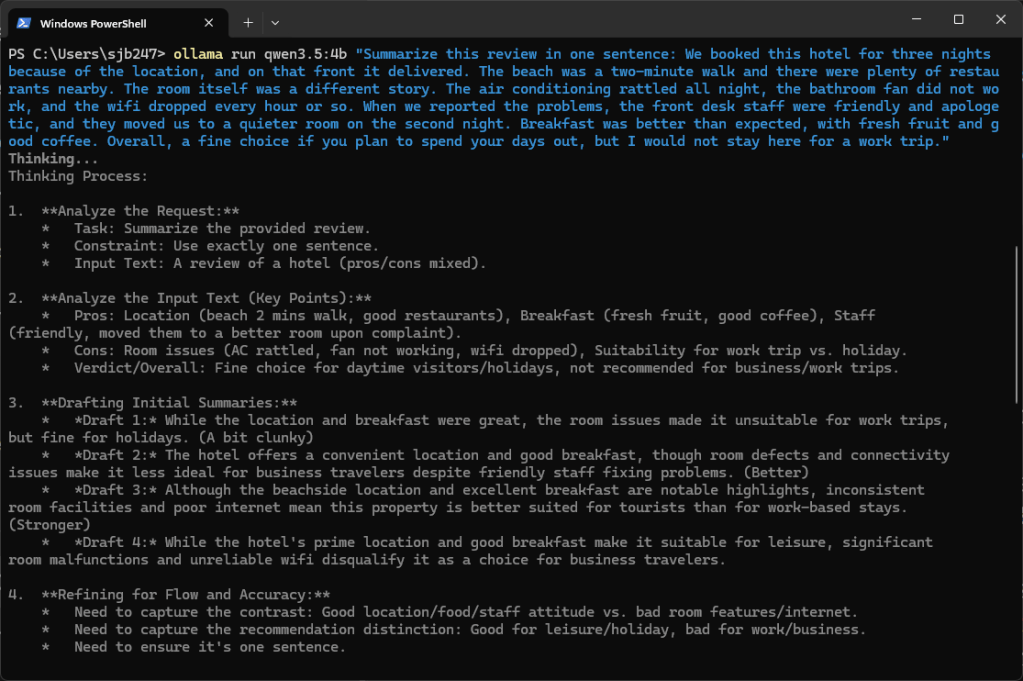
Then give the model a quick test. ollama run loads the model you just downloaded and sends it a prompt. Copy the whole command, including the review:
ollama run qwen3.5:4b "Summarize this review in one sentence: We booked this hotel for three nights because of the location, and on that front it delivered. The beach was a two-minute walk and there were plenty of restaurants nearby. The room itself was a different story. The air conditioning rattled all night, the bathroom fan did not work, and the wifi dropped every hour or so. When we reported the problems, the front desk staff were friendly and apologetic, and they moved us to a quieter room on the second night. Breakfast was better than expected, with fresh fruit and good coffee. Overall, a fine choice if you plan to spend your days out, but I would not stay here for a work trip."
Qwen 3.5 “thinks” by default, so the window first shows its reasoning, starting with “Thinking…”:
When it reaches “…done thinking.”, it prints the one-sentence summary at the bottom:
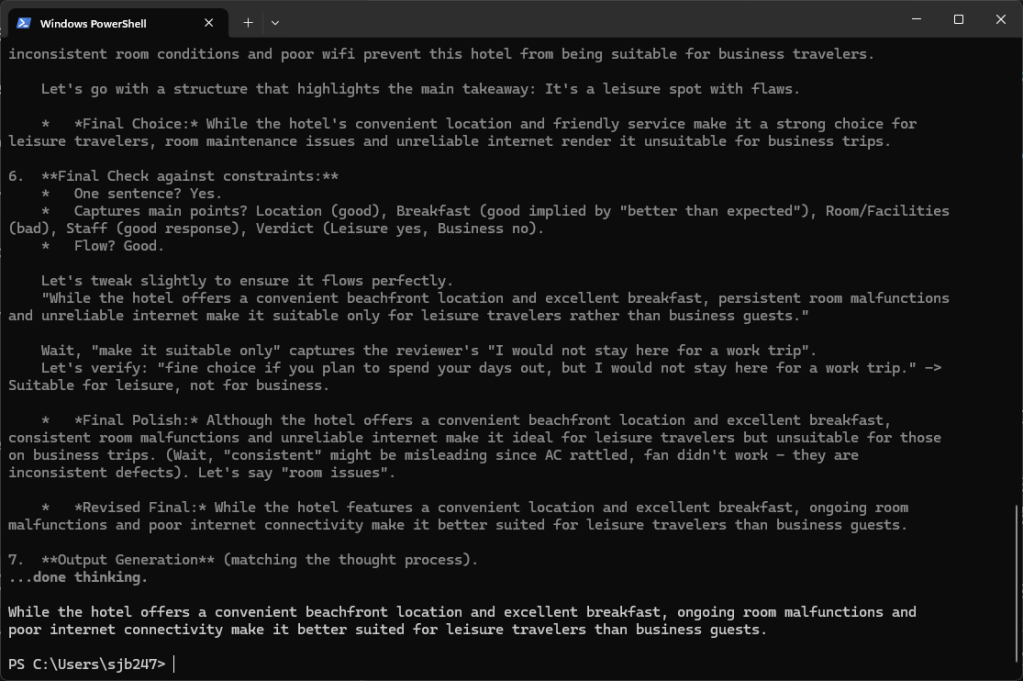
Watching the reasoning can be a useful way to see how the model gets to its answer. It is also slow. To get the answer alone, add --think=false before the prompt:
ollama run qwen3.5:4b --think=false "Summarize this review in one sentence: ..."
The R function in step 3 turns thinking off in the same way, with think = FALSE.
If you get a summary back, you are set. You can also check that Ollama is running by opening http://localhost:11434 in your browser; it should say “Ollama is running”.
A note on the model: qwen3.5:4b (3.4 GB) is the smallest recent Qwen, and it runs fine on an 8 GB laptop. Qwen 3.6 is newer but only comes in larger sizes. If your computer has 32 GB of memory or more, run ollama pull qwen3.6:27b (17 GB) and change the model name in the R code. ollama list shows what you have installed.
2. Set up R and load your data
Install and load the packages, then read the sample data straight from Dropbox. The dl=1 at the end of the link tells Dropbox to send the file itself rather than its preview page. To use your own data, replace the link with the path to your CSV file, which needs a column called review.
install.packages(c("dplyr", "stringr", "httr", "jsonlite", "readr"))library(dplyr)library(stringr)library(httr)library(jsonlite)library(readr)data_url <- "https://www.dropbox.com/scl/fi/zdx5h2v4y7acstw691ctf/Reviews_small.csv?rlkey=h3qfl4hwl1vieobmqed26f6mn&dl=1"data <- read.csv(data_url)str(data)
Next, check that R can reach Ollama. This should return TRUE.
ollama_url <- "http://localhost:11434"status_code(GET(ollama_url)) == 200
If everything worked, R shows 9 reviews with two columns (review and class) and returns TRUE:
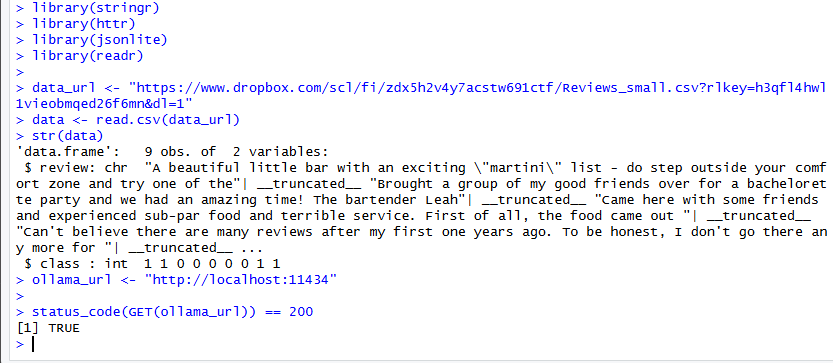
If you get an error instead, Ollama is not running. Open the Ollama app (Mac: Applications; Windows: Start menu) and try again.
3. Write a function that calls the model
This function sends one prompt to the model and returns its answer.
send_to_ollama <- function(text, temp, max_tokens, model = "qwen3.5:4b", seed = NULL) { url <- paste0(ollama_url, "/api/chat") options <- list(temperature = temp, num_predict = max_tokens) if (!is.null(seed)) options$seed <- seed data <- list( model = model, messages = list(list(role = "user", content = text)), stream = FALSE, think = FALSE, options = options ) response <- POST(url, body = toJSON(data, auto_unbox = TRUE), content_type_json(), timeout(300)) parsed <- content(response, as = "parsed") str_trim(parsed$message$content)}
A few arguments do the work:
stream = FALSEreturns the whole answer at once rather than word by word.think = FALSEskips Qwen’s built-in reasoning step, which is slow and uses up the token budget.optionsholds thetemperature, the maximum number of tokens (num_predict) and theseed.- The answer itself is in
parsed$message$content.
The seed and temperature are what make a run reproducible. At temperature = 0 with seed = 90210, rerunning the script on the same machine returns the same answers. At higher temperatures the seed still fixes the random draws, so giving each “judge” its own seed keeps the whole run repeatable.
Test it on one review before running the whole file:
send_to_ollama(paste("Summarize in one sentence:", data$review[1]), temp = 0, max_tokens = 60, seed = 90210)
You should get back a single sentence, something like this:

With the same seed and temperature 0, you will get the same sentence every time you run this on your computer. Your sentence may differ slightly from the one above, since a different machine can produce a different answer.
The first call takes a few extra seconds while the model loads into memory. Later calls are faster.
4. Create the prompt
Write the instructions once. Each review is appended to them before it is sent.
instructions_template <- "You are a helpful assistant. Summarize the following review in one sentence:Review:"
5. Loop through the reviews
The function below loops over every review, temperature and judge, and stores each answer in its own column. You set the starting seed in the call (here 90210), and each judge gets its own seed from there (90210, 90211, and so on), so the whole run can be reproduced. Change the starting seed to get a new, equally reproducible set of judges. It also prints its progress, since a local model is slower than a cloud API.
process_reviews <- function(num_judges, temperatures, data, instructions_template, max_tokens, model = "qwen3.5:4b", seed = 90210) { for (temp in temperatures) { for (judge in 1:num_judges) { col <- sprintf("Qwen_Temp%.1f_Judge%d", temp, judge) message("Running ", col, " ...") data[[col]] <- sapply(data$review, function(review) { prompt <- paste(instructions_template, review, sep = "\n") send_to_ollama(prompt, temp, max_tokens, model = model, seed = seed + judge - 1) }, USE.NAMES = FALSE) } } data}data <- process_reviews( num_judges = 2, temperatures = c(0, 1.0), data = data, instructions_template = instructions_template, max_tokens = 60, seed = 90210)
This codes every review four times: two judges at temperature 0 and two at 1.0. Avoid going much higher than 1.0: a 4B model can start ignoring the “one sentence” instruction.
6. Look at the results
Print the four answers for the first review, then check whether the two judges agree on every review:
# All four answers for the first reviewt(data[1, grep("^Qwen", names(data))])# Do the two judges give identical answers on all nine reviews?identical(data$Qwen_Temp0.0_Judge1, data$Qwen_Temp0.0_Judge2)identical(data$Qwen_Temp1.0_Judge1, data$Qwen_Temp1.0_Judge2)
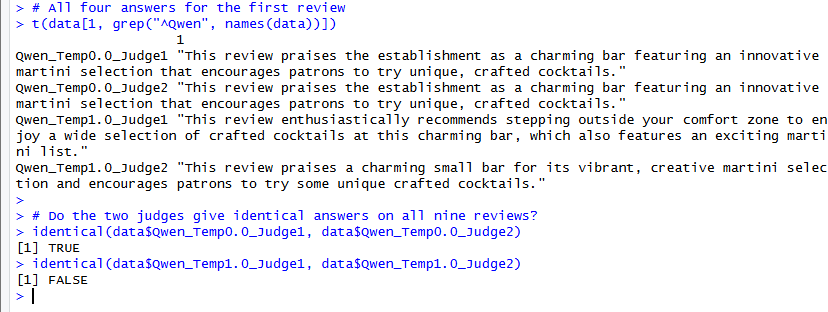
As expected, the first check returns TRUE. At temperature 0 the model always picks its most likely next word, so both judges write the same sentences word for word, even with different seeds. The second check will almost always return FALSE. At temperature 1.0 the model samples, so judges with different seeds write different summaries.
7. Rerun to confirm reproducibility
The seed still matters at temperature 1.0: it makes each judge’s answers repeatable. To see this, keep a copy of the results, run the loop again, and compare:
first_run <- datadata <- process_reviews( num_judges = 2, temperatures = c(0, 1.0), data = data, instructions_template = instructions_template, max_tokens = 60, seed = 90210)identical(first_run, data)
This returns TRUE: same seeds, same temperatures, same machine, same answers in all four columns. Change the starting seed (say to 12345) and the temperature 0 columns stay the same, while the temperature 1.0 columns change.
8. Check whether the seed matters at temperature 0
It does not. At temperature 0 the model does not sample at all; it always takes its most likely next word, so the seed is never used. You can confirm this with two calls that differ only in the seed, first at temperature 0 and then at 1:
prompt <- paste("Summarize in one sentence:", data$review[1])# Temperature 0, two different seedsa <- send_to_ollama(prompt, temp = 0, max_tokens = 60, seed = 90210)b <- send_to_ollama(prompt, temp = 0, max_tokens = 60, seed = 12345)identical(a, b) # TRUE# Temperature 1, the same two seedsc <- send_to_ollama(prompt, temp = 1, max_tokens = 60, seed = 90210)d <- send_to_ollama(prompt, temp = 1, max_tokens = 60, seed = 12345)identical(c, d) # almost always FALSE
So at temperature 0 you get the same answer whatever the seed. Above 0, the seed is what makes a run repeatable: keep it fixed and you get the same answers every time on your machine; change it and the answers change.
Tips and troubleshooting
- “Could not resolve host” or “connection refused”: Ollama is not running. Open the app and try again.
- NULL or empty output: usually a typo in the model name. Run
ollama listto see the exact name. - Too slow: try a smaller model, close other heavy apps, or run overnight. Nine reviews take seconds; 10,000 may take hours on a laptop.
- Report what you used: write down the exact model tag (
qwen3.5:4b) and runollama show qwen3.5:4bto record its details. Unlike a cloud model, this version will not change under you. - Coding categories instead of summaries: Ollama can force the output into a fixed format. Add
format = list(type = "object", properties = list(sentiment = list(type = "string", enum = list("positive", "negative", "mixed"))), required = list("sentiment"))to thedatalist, ask for sentiment in the prompt, and parse the result withfromJSON().
The complete script
Copy this into a new R script and run it top to bottom. It assumes Ollama is installed and running and that you have run ollama pull qwen3.5:4b.
# install.packages(c("dplyr", "stringr", "httr", "jsonlite", "readr"))library(dplyr)library(stringr)library(httr)library(jsonlite)library(readr)# Load the datadata_url <- "https://www.dropbox.com/scl/fi/zdx5h2v4y7acstw691ctf/Reviews_small.csv?rlkey=h3qfl4hwl1vieobmqed26f6mn&dl=1"data <- read.csv(data_url)str(data)# Check that Ollama is running (should be TRUE)ollama_url <- "http://localhost:11434"status_code(GET(ollama_url)) == 200# Send one prompt to the local modelsend_to_ollama <- function(text, temp, max_tokens, model = "qwen3.5:4b", seed = NULL) { url <- paste0(ollama_url, "/api/chat") options <- list(temperature = temp, num_predict = max_tokens) if (!is.null(seed)) options$seed <- seed data <- list( model = model, messages = list(list(role = "user", content = text)), stream = FALSE, think = FALSE, options = options ) response <- POST(url, body = toJSON(data, auto_unbox = TRUE), content_type_json(), timeout(300)) parsed <- content(response, as = "parsed") str_trim(parsed$message$content)}# Promptinstructions_template <- "You are a helpful assistant. Summarize the following review in one sentence:Review:"# Loop over reviews, temperatures and judgesprocess_reviews <- function(num_judges, temperatures, data, instructions_template, max_tokens, model = "qwen3.5:4b", seed = 90210) { for (temp in temperatures) { for (judge in 1:num_judges) { col <- sprintf("Qwen_Temp%.1f_Judge%d", temp, judge) message("Running ", col, " ...") data[[col]] <- sapply(data$review, function(review) { prompt <- paste(instructions_template, review, sep = "\n") send_to_ollama(prompt, temp, max_tokens, model = model, seed = seed + judge - 1) }, USE.NAMES = FALSE) } } data}data <- process_reviews( num_judges = 2, temperatures = c(0, 1.0), data = data, instructions_template = instructions_template, max_tokens = 60, seed = 90210)# Look at the resultst(data[1, grep("^Qwen", names(data))])identical(data$Qwen_Temp0.0_Judge1, data$Qwen_Temp0.0_Judge2) # TRUEidentical(data$Qwen_Temp1.0_Judge1, data$Qwen_Temp1.0_Judge2) # almost always FALSE# The seed does not matter at temperature 0prompt <- paste("Summarize in one sentence:", data$review[1])a <- send_to_ollama(prompt, temp = 0, max_tokens = 60, seed = 90210)b <- send_to_ollama(prompt, temp = 0, max_tokens = 60, seed = 12345)identical(a, b) # TRUE


Leave a Reply